Hoag Physician Partners
Hoag Physician Partners
- Network & Onboarding
- Operations & Processes
- Performance & Quality
- News & Events
- EpicCare Link
News + Events
HPP Events
You can find webinars available for Continuing Medical Education (CME) credit by visiting www.hoag.org/cme. For assistance with CME (Continuing Medical Education) login credentials, please contact Diane Yoon at diane.yoon@hoag.org.
If you need the direct video link that was sent to you, please contact HPP.Providers@hoag.org.
Contact
HPP.Providers@hoag.org or (949) 791-3502 for more information about these events.
Join the Network
Hoag Physician Partners (HPP) is a comprehensive network of world-class physicians that includes primary care and more than 350 specialist physicians representing a broad range of specialties. By joining our independent physician association (IPA), you are now affiliated with the highest ranked hospital in Orange County. Hoag Physician Partners (HPP) allows patients access to the entire Hoag health care system, including Hoag Health & Wellness Centers throughout Orange County, Hoag Imaging Centers and 15 Hoag Urgent Care locations.
Benefits include:
Capitation Payment
Claims Payment
Contract Administration
Credentialing
Eligibility Verification
Medical Authorization
Provider Relation Services
Member Services
Quality Improvement
Utilization Management
If you are interested in joining Hoag Physician Partners, email jointhenetwork@hoag.org.
Contracted Vendors
Labs
As you may know, out-of-network services, including laboratory services, are generally not covered under health maintenance organization (HMO) plans. As patients may be responsible for out-of-network costs, it is imperative that providers refer patients and send test specimens to in-network laboratories. Referring to in-network labs will also assist Hoag in providing streamlined referral/utilization review and claims experiences for our providers and patients. We appreciate our provider network’s role in providing members with positive, cost-effective laboratory service options. Our list of in-network laboratories include:
Routine laboratory services (including but not limited to CBC, RBC, WBC, platelet count, hemoglobin, hematocrit, BMP, enzyme marker, HDL, LDL, hCG, Ammonia, CO2, ALT, SGPT, coagulation, bacterial culture, and urine culture)
Quest Diagnostics
Specialty laboratory services
LabCorp
Caris Life Sciences
Natera
Ambry Genetics
Therapy
List on Excel sheet (Therapy Vendors)
Ancillary Network
List on Excel sheet (Hoag Ancillary Network)
Pediatric Referrals
Claims
Submitting Claims Via Office Ally
Office Ally is HPP’s preferred gateway for electronic data interchange (EDI) transactions.To register for the Office Ally Clearinghouse, visit OfficeAlly.com.
When submitting electronic claims through Office Ally, please use HPP’s payer ID code: HPPZZ.
We encourage you to submit claims electronically, whether you have a small or large practice.
Submitting claims electronically can help your office turn around claims faster, reduce denials and help improve cash flow.
To submit claims by mail, please send to:
Hoag Physician Partners P.O. Box 1260 Costa Mesa, CA 92626
EFT-ERA Payments
To sign up for EFT-ERA Enrollment a separate enrollment form must be completed for every Tax ID you wish to set up, for each individual insurance company (Payer) you want to enroll. For example, if you work with 10 Payers, ECHO will need 10 enrollment forms with the individual Payer name included on each form. There is no fee for this program.
Please allow 7-10 days for processing, please be advised that enrollments requiring additional validation may take longer to complete.Instructions for the EpicLink Remittances:
A PDF remittance advice document can be found within Remittance Advice Search in EpicLink
Search via Claim ID, Member ID, or Provider in EpicLink
Select the hyperlink within the Check Number PDF of Remittance Advice
The link will open and will be available to print or download
Frequently Asked Questions
45 working days.
Submit a written dispute to: PO Box 2010, Costa Mesa, CA 92628
Please reach out by phone: 1-855-538-0841
Referrals & Authorizations
Treatment Authorization
The treatment authorization form should be used when you are unable to access EpicLink and need to submit an authorization immediately.
IMPORTANT NOTE: if a member is missing from EpicLink, please fill out an online member add form located here. A member add form will be needed for authorization requests in EpicLink and requests using the Treatment Authorization form. If you have access to EpicLink, it is highly recommended that you fill out the member add form and, once the member has been added, use EpicLink to request the authorization.
If you need access to EpicLink, please request access here. Once your access has been provisioned, please use EpicLink for all authorization requests.
Please send to the appropriate number according to authorization priority.
Routine/Standard Requests: 949-791-3491
Urgent/Expedited Requests: 949-791-3492
Inpatient Admission Notification: 949-791-3489
To find an In network HPP provider, please use: hoaghealth.org or click here for the HPP Provider Directory.
Frequently Asked Questions
Q: How long will it take for a determination to be made on a referral?
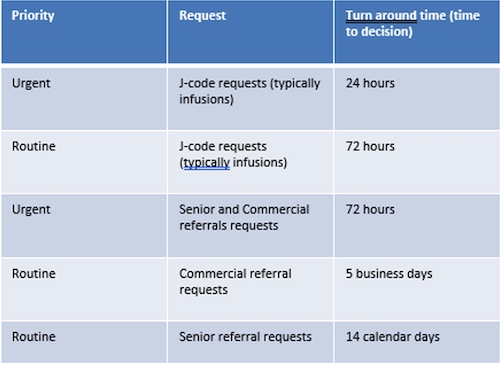
Q: In what instances would we use urgent as a priority? A: Urgent should be used for medical necessity, not patient preference of a patient to get something approved quicker.
Q: How do we submit authorization request? A: Preferred method – EpicLink, Fax – Complete the treatment authorization form and fax to the appropriate department.
Q: What is the quickest way to check the status of a referral? A: You can check the status of a referral on EpicLink
Q: The doctor has not finished their note documentation. Do I need to wait for the clinical documentation before submitting a referral request? A: You can submit the referral request without clinical documentation but we do not recommend it. If we do not receive proper clinical documentation, we will not be able to review the referral which may lead to a denial. We will call to obtain records if possible which will result in unnecessary burden on your office staff and delay a determination being made.
Q: The referral we submitted was denied but the doctor would like to discuss further. What steps do we take? A: A peer to peer can be requested on any denial. The contact information for our MD reviewer will be on the letter generated to you or you may call us at 949-791-3502 to request.
Q: What criteria does UM to make a determination on a referral? A: After determining eligibility and benefit coverage, UM makes determinations based on medical necessity. Listed below is the hierarchy that is used:
Medicare Advantage Plans:
Plan Eligibility, Benefits and Coverage (Evidence of Coverage)
Center for Medicare and Medicaid Services (CMS) National Coverage Determinations (NCDs)
Local Coverage Determinations (LCDs) or State Specific Mandates (Commercial)
Local Coverage Medical Policy Articles (LCAs)
Medicare Benefit/Coverage Policy Manual
Medicare Claims Processing Manual
Medicare Managed Care Manual
Medicare Program Integrity Manual
CMS Drug Compendia
Health Plan Coverage Medical Polices (as applicable)
Milliman Care Guidelines (MCG)
National Comprehensive Cancer Network Guidelines (NCCN)
Diagnostic and Statistical Manual of Mental Disorders (DSM V)
American Society of Addiction Medicine (ASAM)
Hayes Health Technology Website (https://www.hayesinc.com)
RedBook/Micromedex
Commercial:
Plan Eligibility, Benefits and Coverage (Evidence of Coverage)
Health Plan Coverage Medical Polices (as applicable)
Milliman Care Guidelines (MCG)
National Comprehensive Cancer Network Guidelines (NCCN)
Diagnostic and Statistical Manual of Mental Disorders (DSM V)
American Society of Addiction Medicine (ASAM)
Hayes Health Technology Website (https://www.hayesinc.com)
RedBook/Micromedex
Authorization Approval Policies A detailed breakdown of our policies is available on EpicLink.
Policy + Procedures
Current policies and procedures are available on EpicCare Link
To access the Hoag Physician Partners Provider Manual, click here.
To access the HealthPlan Language Assistance Program (LAP) Resources, click here.
Performance
Download the 2022 IHA recognition report here.
Quality
Hoag participates in various health plan Value-Based Programs (VBP) in addition to the Align.Measure.Perform. (AMP) program which is overseen by the Integrated Healthcare Association (IHA). Within those VBP, Hoag Clinic’s Quality Improvement team focuses on HEDIS measures performance, which include chronic disease management, prevention and screening, prenatal care, medication management, and utilization of specific procedures and care settings.
HPP physicians can access Cozeva for quality improvement patient gaps.
For Cozeva access requests, please email us at HoagClinicQI@hoag.org.
CPT 2 Coding guide
U.S. Preventive Services Task Force
The U.S. Preventive Services Task Force (USPSTF) provides evidence-based recommendations to guide clinical preventive care, helping to enhance patient outcomes through informed screening, counseling, and preventive interventions. These guidelines are developed by experts and are designed to assist physicians in delivering consistent, high-quality preventive services. To learn more about integrating these valuable recommendations into your practice, please feel free to refer to the full USPSTF guidelines directly at the link below.
https://www.uspreventiveservicestaskforce.org/uspstf/
Providers may direct any questions regarding the above guidelines to HPP.Providers@hoag.org.
Education pocket cards
Screening Questionnaires
Immunization Recommendations
Public link – https://www.cdc.gov/vaccines/
Contact
Hoag Clinic Quality Improvement Department – HoagClinicQI@hoag.org
Risk Management
Annual Health Assessment (AHA)
Educational Information
There are no current updates on any educational information at this time. For any questions pertaining to risk adjustment, please contact:
Christina Cabiltes at Christina.Cabiltes@hoag.org or (949) 791-3432
Coding Guidelines and Updates
These guidelines are updated on a monthly basis. Each provider will receive a PowerPoint presentation through email.For further questions or clarification, please contact:
Jennifer Clayton at Jennifer.Clayton@hoag.org
Secure File Transfer
Link: https://sft.hoag.org
Every provider has an individual SFTP link, please reach out to Christina Cabiltes at Christina.Cabiltes@hoag.org or (949) 791-3432 for your direct url.
EpicCare Link - Contracted Vendors
What is EpicCare Link
EpicCare Link is Epic’s web-based application for connecting Hoag to community practices. Through EpicCare Link, community users will be given secure access to patient information in the Hoag Epic data repository. EpicCare Link allows Hoag to extend patient information to external facilities and improve the continuity of care in our community.
With EpicCare Link, your office will have access to:
Securely review referred and admitted patients’ medical records
Submit and view orders, referrals, and authorizations
View claims status and remittance advices
Review clinical documentation to assist with billing and reconciliation
Upload documents into patient’s Epic chart
Receive automated messages through InBasket regarding authorizations, labs, appointments, and more
FAQ for EpicCare Link for your convenience.
If you already have Hoag’s EpicCare Link login and password, login with your Hoag provided credentials here.
If looking to request access, please reach out to your site administrator for access.
If you are having login issues or have any additional questions, please contact us at HPP.Providers@hoag.org or via phone at 949-791-3502.
Please review the self paced training videos below to provide additional information for using Hoag’s electronic medical record portal.
Video knowledge include information for:
Site Administrators actions and procedures
Patient information and filing
Secure messaging
Submitting and viewing authorizations
Viewing claims
Using the Customer Service Request form- and much more!
For any questions, please email us.
Requesting a New Site EpicCare Link Account
The initial request should be submitted for the site administrator for the new site. Once the site administrator receives their login information, all subsequent user requests will be submitted through the site administrator's account.
First-time organizations can sign up using either of the following options:
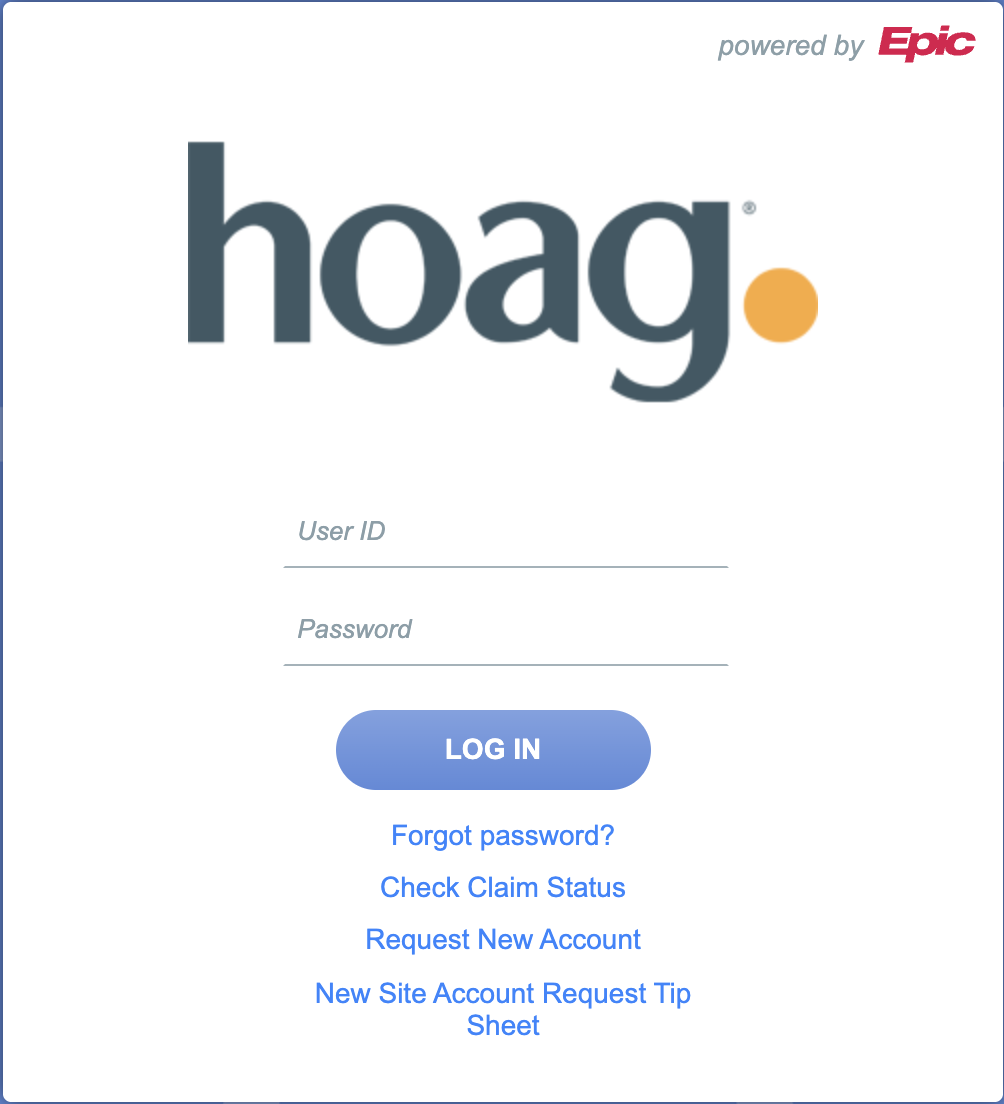
Enroll through EpicCare Link New Account Request: Please refer to the Tip Sheet, which can also be found at the following site: https://carelink.hoag.org/EpicCareLink_PRD/common/epic_login.asp
OR
Follow these two steps:
Step 1: Enroll your organization by contacting HPP.Providers@hoag.org
Step 2: Complete the required EpicCare Link forms, which can be downloaded below.
**The organization must have a site administrator. They handle site verification, user requests, and password support. More than one administrator can be assigned if needed.
Site Administrator Additional Responsibilities: • Requesting new user accounts • Deactivating accounts for users who no longer need access • Resetting passwords • Performing quarterly site verification
Once the EpicCare Link Team receives the completed agreement forms, they will notify the Site Admins of the outcome.
Adding New Users to an Existing Site
New user requests must be submitted by the Site Administrator along with a completed and signed User Agreement.
Site Administrator Instructions:
Log into EpicCare Link: https://carelink.hoag.org/EpicCareLink_PRD/common/epic_login.asp
Navigate to Admin > Account Requests > Request New Account
Select the appropriate template type and attach the signed User Agreement. The user is responsible for completing their portion of the form, and the site administrator must sign page 2 as the security authorizer.
Forms
Site Administrator Responsibilities (required if you are requesting an additional site administrator)
Important Reminders:
Site Administrator – Required Forms
Data Access User Agreement
Site Administrator Responsibilities Agreement
New User Requests: Required Forms
Data Access User Agreement
The site administrator must sign Section III of the Data Access User Agreement and submit the request through their EpicCare Link account.
Organization Requirements:
Every organization must sign one Hoag Data Sharing Agreement.
Each organization must have at least one Site Administrator, who is responsible for:
Requesting new user accounts
Deactivating accounts for users who no longer need access
Resetting passwords
Completing quarterly site verification
Login Issues:
If you have received your credentials but are unable to log in to Hoag EpicCare Link, please contact your site administrator before reaching out to HPP.Providers@hoag.org
Questions:
For additional assistance, email HPP.Providers@hoag.org.
Stay up-to-date on the latest news from Hoag
By submitting this request, you agree to receive communications from Hoag and accept our Privacy Policy and Terms of Use.